
If you created a personal Google Play developer account after November 2023, you cannot publish your app until you run a closed test with 12 testers for 14 days. This page is the full reference for that policy: where it came from, the change from 20 testers to 12, who is exempt, and what Google actually counts. If you are just here for the testers themselves, you can get 12 testers for Google Play and come back to the policy details later.
Updated September 2026
What is Google Play’s 12 Testers for 14 Days Policy ?
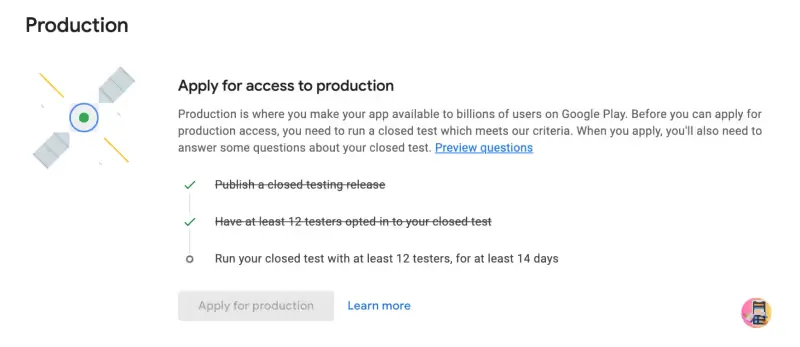
To publish an app on the Play Store, developers must run a closed test with at least 12 testers continuously over 14 days. These testers must opt-in and actively engage with your app. You need to fulfill the below points.
- Have at least 12 testers install your app
- Keep these testers opted-in for 14 continuous days
- This policy will only apply to personal google play console accounts created after 13th November 2023.
How the policy got here: 20 testers, then 12
The requirement has changed once since launch, and a lot of advice online still quotes the old numbers. The short version:
- November 13, 2023: Google introduced mandatory closed testing for new personal developer accounts. The original requirement was 20 testers opted in for 14 continuous days.
- December 2024: Google reduced the tester minimum from 20 to 12. The 14-day continuous testing period did not change.
- Since then: the rule has been stable. If a guide tells you that you need 20 testers, it predates December 2024.
Google’s stated goal is app quality: forcing every new developer to watch real people use their app for two weeks before it reaches the public store.
Who the policy applies to (and who is exempt)
- Applies to: every app published from a personal Play Console account created on or after November 13, 2023. It applies per app: each new app needs its own closed test.
- Exempt: organization (business) Play Console accounts, and personal accounts created before November 13, 2023.
- Updates are exempt: once an app has production access, its updates never need testers again. And your testers do not have to be new people each time; the same 12 can test every app you publish.
What actually counts: opted in, engaged, 14 days
Most failed closed tests come from misreading what Google measures. Three mechanics matter:
- Opt-ins, not installs. A tester only counts after they open your closed testing link and complete the opt-in. Adding an email to your tester list does nothing by itself, which is why Play Console often shows 0 testers currently opted in even after you added 12 addresses.
- Opting in is sticky. Once opted in, a tester keeps counting even if they uninstall the app. Only pressing “Opt out” on the testing page removes them, so your count rarely drops below 12 by accident. If it does dip, the 14-day clock does not reset; Google judges tester engagement later, when it reviews your production access application.
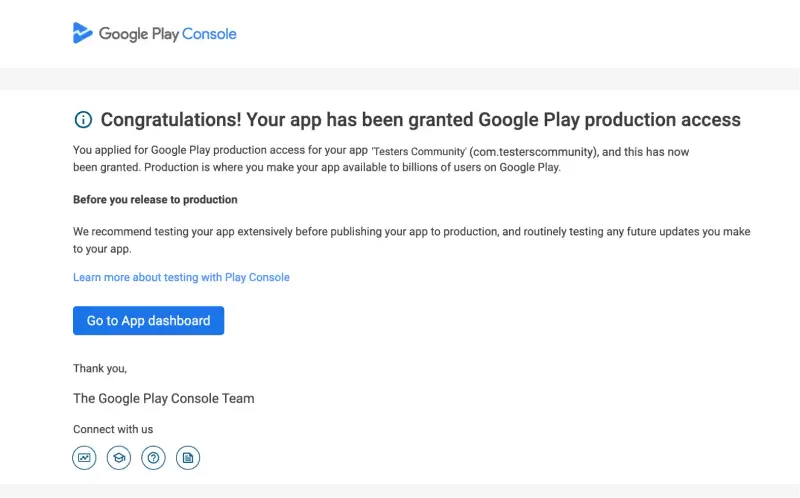
- Fourteen continuous days, then a review. Completing the 14 days does not publish your app. It unlocks the production access application, where Google looks at how actively your testers actually used the app. That is where thin, install-and-forget testing gets rejected.
For the setup side (creating the track, email lists vs Google Groups, countries, the opt-in link), follow the Google Play closed testing guide.
How developers actually get their 12 testers
There are four realistic routes. The honest summary:
- The free Testers Community app. A community of developers who test each other’s apps for credits; more than 50,000 apps have been tested this way. Download the Testers Community app, test 3 apps to earn credits, and post your own. Free, takes a little effort, rated 4.6 on Google Play.
- The professional service. If you would rather skip the exchange, you can get 12 testers for Google Play as a done-for-you service: 15 testers (Starter, $15) or 25 testers (Pro) opt in within 6 hours, stay the full 14 days, and every plan is backed by a production access guarantee.
- Friends and family. Free, but the least reliable: people forget to opt in, install once and never open the app again, and iPhone friends cannot help at all.
- Reddit and developer forums. Tester-exchange threads work but are slow and unmanaged. Start with r/AndroidAppTesters or r/TestersCommunity, and read each community’s self-promotion rules first.
Free vs paid: which should you choose?
| Free community app | Paid service | |
|---|---|---|
| Price | $0 | $15 to $25 |
| Testers | 12 | 15 (Starter) or 25 (Pro) |
| Time to get testers | About a day | Within 6 hours |
| Guarantee | None | Production access, or a full refund |
| Effort | Test 3 apps first | Just submit your app |
| Best for | Tight budgets | Speed and certainty |
Tips to get accepted, not rejected
- Aim for more than 12 active testers. A buffer of 15 to 25 protects you if a few go quiet.
- Prioritize engagement over headcount. Ask testers to open your app on several different days.
- Share the opt-in link, not the store link. Installs from the store do not count toward closed testing.
- Make sure your app does not crash on launch. Crashes kill engagement fast.
- Answer the production access questions fully. Incomplete answers are a listed rejection reason.
12 testers policy FAQ
You might have got multiple doubts while reading through this article. You are not alone on those questions and you can find answers to most of those questions below.
1. What if any of the testers uninstall the app before 14 days ☹️?
Google states that once a tester opts in, they count toward your 14-day requirement even if they uninstall the app. You don’t need to worry about uninstalls breaking your closed test.
2. How to opt out of the app testing program?
Testers can only opt out via the testing web link. Visiting the app’s testing page will show an “Opt out” button. Simply uninstalling the app does not opt them out.
3. How many testers are needed to get production access?
The requirement is 12 active testers for 14 consecutive days. Note that having more than 95 testers also won’t guarantee approval. Google evaluates many factors beyond tester count. Once you have 12 testers, the 14-day clock starts and you must follow Google’s guidance to request production access.
Read more here: https://www.testerscommunity.com/blog/google-play-production-access-rejected
4. How to publish an app on the Play Store without 12 testers 😤?
If you have an organisational Play Console account, or your personal account was created before November 13, 2023, you don’t need any testers. Otherwise, the 12-tester requirement applies.
5. Do we need 12 testers every time we publish a new app?
Yes, you need to find 12 testers for every new app you publish on play store. Once you got the production access for an app, you don’t need 12 testers again to release updates to that app.
6. How to get 12 testers for free?
Download the Testers Community app from Google Play (https://play.google.com/store/apps/details?id=com.testerscommunity) and post your closed-test link, and our community will help you find 12 testers at no cost.
7. Do we need to test our app for 14 days continuously?
Testers don’t have to open the app every single day for the count to hold, but Google looks at how actively they engaged when it reviews your production access application. Steady activity across the 14 days is what gets approved.
8. Google Play “12 Testers” vs. “20 Testers” policy?
It’s the same closed-testing policy, but new personal accounts now only require 12 testers instead of 20 to qualify for production access.
9. What is Google Play’s “12 testers for 14 days” policy?
In simple terms, developers need to test their apps with 12 testers for 14 days continuously to publish their apps on play store. It is mandatory for all the apps you publish on play store. It only applies to personal Google Play Console accounts created after November 13, 2023.
10. What are the different testing tracks in Play Console?
- Internal Testing: Quick distribution to a small group (up to 100 testers) for early feedback.
- Closed Testing: Required for production access; needs 12 testers opted in for 14 days.
- Open Testing: Public beta before production; available after closed-testing requirements are met.
- Production: Full app availability on Google Play;
Conclusion
We really feel this is a very important and useful move for individual developers. But this doesn’t mean we will be getting production access very easily. Even under the old 20-tester version of the policy, we saw apps with more than 80 testers get production access rejected. For Google it is not about the number of testers; engagement during the 14 days and the quality of your production access answers matter more. You can read this blog to avoid production access rejection.
You can see more discussion about Google Play Console at r/TestersCommunity


