
Guide 3 of 4·Day 15·5 min read
How to apply for production access
All 10 questions on Google's form, exactly as Google asks them.
Once your full 14 days of testing are complete, Google Play lets you apply for production access, so day 15 is application day. The application is a 10-question form about your app and your closed test: 8 free-text questions and 2 multiple choice. Google typically reviews it within 2 to 5 days. Your Production Access Report contains pre-filled answers written from your actual test, so most of the work is already done before you open the form.
- 1
Download your Production Access Report
Open your app in the dashboard and go to the Reports tab. The report contains pre-filled answers written from your app's actual test. - 2
Open the form in Play Console
On your app's Dashboard in Play Console, an Apply for production task appears once the 14 days are complete. If the button is greyed out, the 14-day streak has not finished yet: check back the next day. - 3
Answer with your report beside you
Use the pre-filled answers as your base and adjust anything specific to your app. Every question Google asks is listed below, so nothing on the form surprises you. - 4
Submit and relax
Google typically reviews production access applications within 2 to 5 days. You will hear back by email.
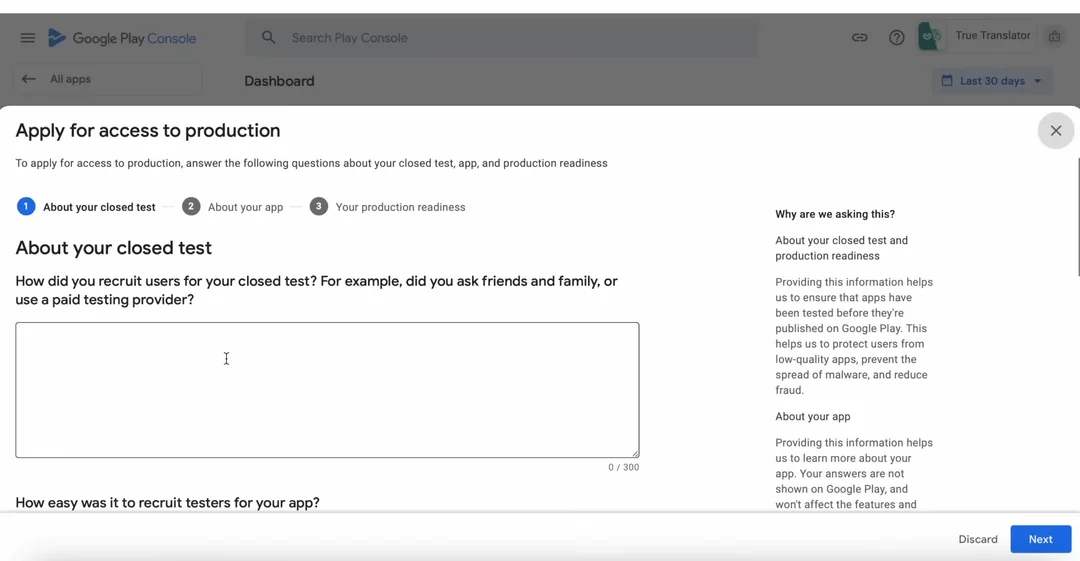
One principle carries the whole form: specific beats long. Two sentences with tester counts, device models, and a named fix beat three paragraphs of praise. The reviewer is looking for real testers, real feedback, and real iteration, and generic answers like "testers loved the app, no issues found" are the single most common reason applications fail. These are the questions Google asks; your report has each answer pre-filled from your app's real test, so write from that, not from anyone else's answers.
Question 1 of 10
How did you recruit users for your closed test? For example, did you ask friends and family, or use a paid testing provider?
Google lists paid testing providers in the question itself, so there is no wrong source. The reviewer only checks that your recruitment story is consistent with testers who behaved like real users.Question 2 of 10·Multiple choice
How easy was it to recruit testers for your app?
Easy is the truthful pick when recruitment went through a testing community: your testers opted in within hours. The reviewer only checks that this matches the story you told in question 1.Very DifficultDifficultNeitherEasyPick thisVery EasyQuestion 3 of 10
Describe the engagement you received from testers during your closed test
The core question of the whole form. Show sustained usage across the full 14 days: how often testers opened the app, which flows they used, and that activity lasted to the end instead of spiking on day one.Question 4 of 10
Provide a summary of the feedback that you received from testers. Include how you collected the feedback.
Concrete beats glowing. List 3 to 5 specific items and include at least one critical one: a real 14-day test always surfaces something, and reviewers distrust tests that found nothing. Your Feedback Report gives you this list ready-made.Question 5 of 10
Who is the intended audience for your app?
Less about your test, more about your plan. Name the user, the launch markets, and where you expect early users to come from.Question 6 of 10
Describe how your app provides value to the users.
This is where Google filters out thin apps. Name the problem, the user it belongs to, and two or three features tied to real outcomes, not a feature list.Question 7 of 10·Multiple choice
How many installs do you expect your app to have in your first year?
The reviewer checks realism, not ambition. Most first apps land under 10,000 installs in year one. Pick a larger range only if you have an existing audience to justify it, and make sure it squares with your question 5 answer.Under 1k1k to 10kPick this10k to 100k100k+Question 8 of 10
What changes did you make to your app based on what you learned during your closed test?
Tie each change to a piece of feedback from question 4 so the two answers corroborate each other, and mention version numbers. Shipping at least one update mid-test is a strong signal.Question 9 of 10
How did you decide that your app is ready for production?
Ground the answer in the test, not in a feeling: stability numbers, completed core flows, and feedback shifting from bug reports to feature requests all work well.Question 10 of 10
What did you do differently this time?
You will only see this question if a previous production access application was rejected. On a first-time application it does not appear at all, so do not go looking for it. If it does show up, describe a genuinely different test: new testers, higher engagement, and updates shipped during the new window.
Apply with confidence
Stuck on something? We are one email away.
support@testerscommunity.com