
Good to know·4 min read
Why production access gets rejected
The reasons Google turns applications down, and how to make sure none apply to you.
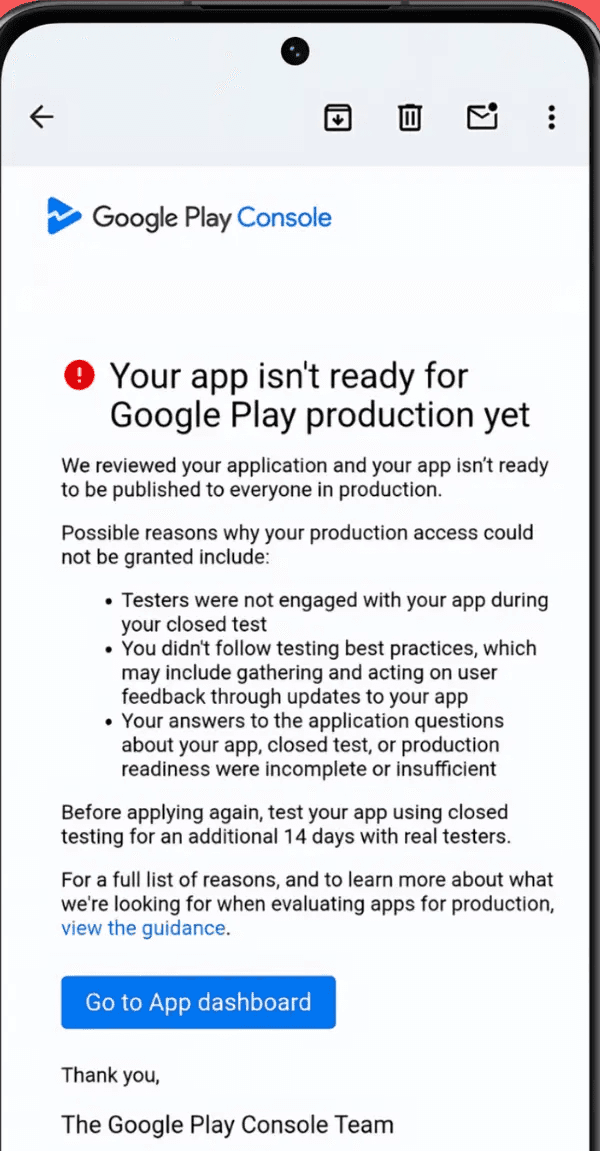
When a production access application fails, Google sends the email below. It names three possible reasons, and a fourth sits outside the email: the app itself not following Google Play's guidelines. Every rejection comes down to at least one of these, and all of them are avoidable once you know what the review actually measures.
- 1
Testers were not engaged with your app
The most common reason by far. Google tracks sessions, time in app, and retention across the 14 days, not just installs. This is where self-recruited tests fail: friends and family install once, open the app twice out of politeness, and forget it exists. To the review, that looks like an app nobody used, and it triggers this rejection even though the opted-in counter showed 12. - 2
No updates during the test
Publishing one build and letting it sit for 14 days signals that no feedback was collected or acted on. Google wants to see testing best practices: gather feedback, act on it, and release 2 to 3 updates during the window, even small ones. - 3
Incomplete form answers
One-line answers to the 10-question form. The reviewer needs specifics: tester counts, feedback themes, and the version numbers of fixes you shipped. "Testers liked the app, no issues found" is the classic failing answer. - 4
The app itself does not follow the guidelines
Separate from the test entirely: an app that breaks Google Play's guidelines can be turned down no matter how strong the closed test was. Broken core features, a data safety form that does not match what the app collects, or policy-violating content all count. Give the app a final polish and a policy check before you apply.
The expensive part is the loop. A rejection sends you back to run closed testing for another 14 days, and there is no appeal process. If engagement is still weak in round two, the result is the same, which is how developers lose months cycling through 14-day windows with the same inactive testers. Google reviews every criterion independently, so fixing some of them is not enough.
This situation is also the one we know best. Thousands of developers have come to us after a rejection, having run their first test with friends, family, relatives, or another service, and been approved on their very first attempt with us. A rejection costs you time, but it is fully recoverable, and recovering from it is something we do every day.
How your test covers the first three
Stuck on something? We are one email away.
support@testerscommunity.com